 Loading... Please wait...
ku/oc/tejkniotco//troppus 
+44 (0)1226 827277 
Please Choose Your Preferred Currency
OctoInkjet is based in the UK and our site supports and accepts multiple currencies.
Please select the currency you wish to view prices and/or pay in below:
 GBP / Pounds Sterling (Default)
 EUR / Euros
 USD / US Dollars
 CAD / Canadian Dollars
 AUD / Australian Dollars
Note:
- GBP, EUR, USD can be used to pay via all payment options
- CAD & AUD can only be used to pay via Paypal
Printer: Quickfind
Type model number & select:
This tool will automatically edit and/or reformat your input to help locate your chosen printer
Categories
- * Canon Printer Products
- G GM Series
- Pixma G1420
- Pixma G1501
- Pixma G1510
- Pixma G1520
- Pixma G2420
- Pixma G2460
- Pixma G2501
- Pixma G2510
- Pixma G2520
- Pixma G2560
- Pixma G3420
- Pixma G3460
- Pixma G3501
- Pixma G3510
- Pixma G3520
- Pixma G3560
- Pixma G4510
- Pixma G4511
- Pixma G540
- Pixma G550
- Pixma G5050
- Pixma G640
- Pixma G650
- Pixma G6010
- Pixma G6020
- Pixma G6040
- Pixma G6050
- Pixma G6060
- Pixma G7010
- Pixma G7020
- Pixma G7040
- Pixma G7050
- Pixma G7060
- i Series
- iP Series
- Pixma iP3000
- Pixma iP3300
- Pixma iP3500
- Pixma iP3600
- Pixma iP4000
- Pixma iP4200
- Pixma iP4300
- Pixma iP4500
- Pixma iP4600
- Pixma iP4700
- Pixma iP4820
- Pixma iP4850
- Pixma iP4920
- Pixma iP4950
- Pixma iP5000
- Pixma iP5100
- Pixma iP5200
- Pixma iP5300
- Pixma iP6000D
- Pixma iP6600D
- Pixma iP6700D
- Pixma iP7250
- Pixma iP8500
- Pixma iP8750
- iX Series
- MG Series
- Pixma MG5120
- Pixma MG5150
- Pixma MG5220
- Pixma MG5250
- Pixma MG5320
- Pixma MG5350
- Pixma MG5450
- Pixma MG5550
- Pixma MG5650
- Pixma MG5750
- Pixma MG5751
- Pixma MG5752
- Pixma MG5753
- Pixma MG6120
- Pixma MG6150
- Pixma MG6220
- Pixma MG6250
- Pixma MG6350
- Pixma MG6450
- Pixma MG6650
- Pixma MG6850
- Pixma MG6851
- Pixma MG6852
- Pixma MG6853
- Pixma MG7150
- Pixma MG7550
- Pixma MG7750
- Pixma MG7751
- Pixma MG7752
- Pixma MG7753
- Pixma MG8120
- Pixma MG8150
- Pixma MG8220
- Pixma MG8250
- MP Series
- MX Series
- Pro Series
- TR Series
- TS Series
- Pixma TS5050
- Pixma TS5051
- Pixma TS5053
- Pixma TS5055
- Pixma TS6050
- Pixma TS6051
- Pixma TS6052
- Pixma TS6150
- Pixma TS6151
- Pixma TS6250
- Pixma TS6251
- Pixma TS6350
- Pixma TS6351
- Pixma TS705
- Pixma TS8050
- Pixma TS8051
- Pixma TS8052
- Pixma TS8053
- Pixma TS8150
- Pixma TS8151
- Pixma TS8152
- Pixma TS8250
- Pixma TS8251
- Pixma TS8252
- Pixma TS8350
- Pixma TS8351
- Pixma TS8352
- Pixma TS9055
- Pixma TS9050
- Pixma TS9150
- Pixma TS9155
- Pixma TS9550
- Pixma TS9551C
- Canon Cleaning
- G GM Series
- * Epson Printer Products
- Artisan Series
- B Series
- BX Series
- C Series
- CX Series
- CX2800
- CX2900
- CX3100
- CX3200
- CX3300
- CX3400
- CX3500
- CX3600
- CX3650
- CX3700
- CX3800
- CX3805
- CX3810
- CX3850
- CX3900
- CX4000
- CX4080
- CX4100
- CX4200
- CX4300
- CX4400
- CX4450
- CX4500
- CX4600
- CX4700
- CX4800
- CX4850
- CX4900
- CX5000
- CX5100
- CX5200
- CX5300
- CX5400
- CX5500
- CX5505
- CX5600
- CX5700F
- CX5800F
- CX5900
- CX6000
- CX6300
- CX6400
- CX6500
- CX6600
- CX6900F
- CX7000F
- CX7300
- CX7400
- CX7450
- CX7700
- CX7800
- CX8300
- CX8400
- cx8450
- CX9300F
- CX9400F
- CX9475F
- CX9500F
- D Series
- DX Series
- EP Series
- ET Series
- ET14000
- ET15000
- ET16150
- ET16500
- ET16600
- ET16650
- ET16680
- ET1810
- ET2500
- ET2550
- ET2600
- ET2610
- ET2650
- ET2700
- ET2710
- ET2711
- ET2712
- ET2714
- ET2715
- ET2720
- ET2721
- ET2726
- ET2750
- ET2756
- ET2760
- ET2800
- ET2810
- ET2811
- ET2812
- ET2814
- ET2815
- ET2820
- ET2821
- ET2825
- ET2826
- ET2830
- ET2831
- ET2832
- ET2833
- ET2834
- ET2835
- ET2836
- ET2838
- ET2840
- ET2850
- ET2851
- ET2856
- ET3600
- ET3700
- ET3750
- ET3760
- ET3850
- ET4500
- ET4550
- ET4700
- ET4750
- ET4760
- ET4800
- ET4850
- ET5150
- ET5170
- ET5800
- ET5850
- ET5880
- ET7700
- ET7750
- ET8500
- ET8550
- ETM1140
- ETM1170
- ETM1180
- ETM16600
- ETM16680
- ETM2140
- ETM2170
- ETM3140
- ETM3170
- ETM3180
- K, L Series
- K100
- K101
- K200
- K201
- K300
- K301
- L120
- L130
- L132
- L220
- L100
- L110
- L1110
- L11160
- L1300
- L14150
- L1455
- L15150
- L15160
- L15180
- L1800
- L200
- L210
- L222
- L300
- L301
- L303
- L310
- L3050
- L3060
- L3110
- L312
- L3100
- L3111
- L3150
- L3160
- L3165
- L3166
- L3200
- L3201
- L3203
- L3205
- L3206
- L3207
- L3208
- L3209
- L3210
- L3211
- L3213
- L3215
- L3216
- L3217
- L3218
- L3219
- L3250
- L3251
- L3253
- L3255
- L3256
- L3257
- L3258
- L3259
- L3260
- L3261
- L3263
- L3265
- L3266
- L3267
- L3268
- L3269
- L350
- L351
- L353
- L355
- L358
- L360
- L362
- L365
- L366
- L380
- L382
- L385
- L386
- L395
- L4000
- L4150
- L4160
- L4151
- L4153
- L4156
- L4163
- L4166
- L4167
- L4169
- L4170
- L455
- L456
- L485
- L486
- L550
- L555
- L565
- L566
- L6000
- L6160
- L6170
- L6176
- L6190
- L6260
- L6270
- L6276
- L6290
- L6460
- L6490
- L655
- L665
- L6550
- L6570
- L6580
- L800
- L805
- L810
- L8160
- L8180
- L850
- M, ME Series
- N, NX Series
- P, PX Series
- PM Series
- Photo Series
- R Series
- RX Series
- S, SX Series
- Stylus Color
- SureColor
- T Series
- TX Series
- TX100
- TX101
- TX102
- TX103
- TX105
- TX106
- TX109
- TX110
- TX111
- TX115
- TX116
- TX117
- TX119
- TX120
- TX121
- TX125
- TX130
- TX133
- TX135
- TX200
- TX203
- TX205
- TX209
- TX210
- TX213
- TX219
- TX220
- TX230W
- TX235
- TX235W
- TX300F
- TX320F
- TX400
- TX405
- TX408
- TX409
- TX410
- TX415
- TX419
- TX420
- TX430W
- TX435W
- TX510FN
- TX515FN
- TX525WD
- TX550W
- TX560WD
- TX600FW
- TX610FW
- TX620FWD
- TX650FW
- TX659
- TX700W
- TX710W
- TX720WD
- TX800FW
- TX810FW
- TX820FWD
- WF, Workforce Series
- WorkForce 1100
- WorkForce 30
- WorkForce 310
- WorkForce 315
- Workforce 320
- Workforce 323
- Workforce 325
- WorkForce 40
- WorkForce 435
- WorkForce 500
- WorkForce 520
- WorkForce 545
- WorkForce 60
- WorkForce 600
- WorkForce 610
- WorkForce 615
- WorkForce 630
- WorkForce 633
- WorkForce 635
- WorkForce 645
- WorkForce 840
- WorkForce 845
- Workforce WF2010W
- Workforce WF2510WF
- Workforce WF2511
- Workforce WF2518
- Workforce WF2520NF
- Workforce WF2521
- Workforce WF2528
- Workforce WF2530WF
- Workforce WF2531
- Workforce WF2532
- Workforce WF2538
- Workforce WF2540WF
- Workforce WF2548
- Workforce WF2541
- Workforce WF2630WF
- Workforce WF2631
- Workforce WF2650DWF
- Workforce WF2651
- Workforce WF2660DWF
- Workforce WF2661
- Workforce WF2750DWF
- Workforce WF2751
- Workforce WF2760DWF
- Workforce WF2761
- Workforce WF2810DWF
- Workforce WF2830DWF
- Workforce WF2835DWF
- Workforce WF2850DWF
- Workforce WF2860DWF
- Workforce WF2865DWF
- Workforce WF3010DW
- Workforce WF3520
- Workforce WF3520DWF
- Workforce WF3530
- Workforce WF3530DTWF
- Workforce WF3540
- Workforce WF3540DTWF
- Workforce WF3620
- Workforce WF3620DWF
- Workforce WF3630DTWF
- Workforce WF3640
- Workforce WF3640DTWF
- Workforce WF3720
- Workforce WF3723
- Workforce WF3725
- Workforce WF4015 DN
- Workforce WF4525 DNF
- Workforce WF4535 DWF
- Workforce WF4545 DWF
- Workforce WF7010
- Workforce WF7015
- Workforce WF7110
- Workforce WF7110DTW
- Workforce WF7515
- Workforce WF7520
- Workforce WF7521
- Workforce WF7525
- Workforce WF7610
- Workforce WF7610DWF
- Workforce WF7620
- Workforce WF7620DTWF
- Workforce EC Series
- Workforce M Series
- Workforce Pro Series
- Workforce Pro WF3820DWF
- Workforce Pro WP4010
- Workforce Pro WP4015 DN
- Workforce Pro WP4020
- Workforce Pro WP4023
- Workforce Pro WP4025 DW
- Workforce Pro WP4090
- Workforce Pro WP4092
- Workforce Pro WP4095 DN
- Workforce Pro WP4515 DN
- Workforce Pro WP4520
- Workforce Pro WP4525 DNF
- Workforce Pro WP4530
- Workforce Pro WP4532
- Workforce Pro WP4533
- Workforce Pro WP4535 DWF
- Workforce Pro WP4540
- Workforce Pro WP4545 DWF
- Workforce Pro WP4590
- Workforce Pro WP4592
- Workforce Pro WP4595 DNF
- Workforce Pro WF4630 DWF
- Workforce Pro WF4640 TDWF
- Workforce Pro WF4720DWF
- Workforce Pro WF4725DWF
- Workforce Pro WF4730DTWF
- Workforce Pro WF4740DTWF
- Workforce Pro WF4745DTWF
- Workforce Pro WF4820DWF
- Workforce Pro WF4830DTWF
- Workforce Pro WP M4015 DN
- Workforce Pro WP M4095 DN
- Workforce Pro WP M4525 DNF
- Workforce Pro WP M4595 DNF
- Workforce Pro WF5110 DW
- Workforce Pro WF5190 DW
- Workforce Pro WF5690 DWF
- Workforce Pro WF R5190 DTW
- Workforce Pro WF R5690 DTWF
- Workforce Pro WF7310
- Workforce Pro WF7310DTW
- Workforce Pro WF7820
- Workforce Pro WF7830
- Workforce Pro WF7840
- Workforce Pro WF7830DTWF
- Workforce Pro WF7840DTWF
- Workforce Pro WF8010 DW
- Workforce Pro WF8090 DW
- Workforce Pro WF8510
- Workforce Pro WF8590
- Workforce ST Series
- XP Series
- XP100
- XP102
- XP103
- XP15000
- XP20
- XP200
- XP201
- XP202
- XP203
- XP204
- XP206
- XP205
- XP207
- XP208
- XP210
- XP211
- XP212
- XP213
- XP214
- XP215
- XP216
- XP217
- XP225
- XP235
- XP240
- XP241
- XP242
- XP243
- XP245
- XP247
- XP255
- XP30
- XP33
- XP300
- XP301
- XP302
- XP303
- XP305
- XP306
- XP310
- XP3100
- XP3105
- XP311
- XP312
- XP313
- XP315
- XP3150
- XP320
- XP322
- XP323
- XP325
- XP330
- XP332
- XP333
- XP335
- XP340
- XP342
- XP343
- XP345
- XP352
- XP355
- XP400
- XP401
- XP402
- XP403
- XP405
- XP406
- XP410
- XP4100
- XP4105
- XP411
- XP412
- XP413
- XP415
- XP4150
- XP420
- XP422
- XP423
- XP425
- XP430
- XP431
- XP432
- XP434
- XP435
- XP440
- XP441
- XP442
- XP445
- XP452
- XP500
- XP510
- XP5100
- XP5105
- XP5115
- XP5150
- XP520
- XP530
- XP540
- XP55
- XP600
- XP6000
- XP6005
- XP605
- XP610
- XP6100
- XP6105
- XP615
- XP620
- XP625
- XP630
- XP635
- XP640
- XP645
- XP700
- XP701
- XP710
- XP7100
- XP720
- XP750
- XP760
- XP800
- XP801
- XP802
- XP810
- XP820
- XP821
- XP830
- XP850
- XP8500
- XP860
- XP8600
- XP8605
- XP8700
- XP900
- XP950
- XP960
- XP970
Cartridge Clips/Holders [Canon]


$0.53 (ex VAT)

Product Description
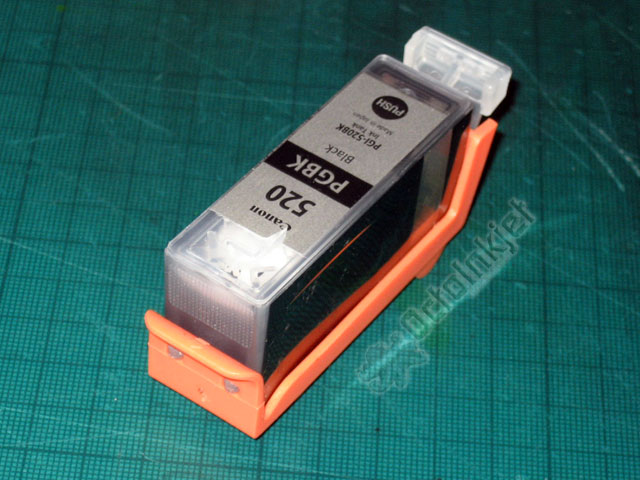
These cartridge clips/holders replace the original Orange covers that are supplied with OEM/Original cartridges.
The plastic holder (containing a silicon disk) clips firmly onto the base of the appropriate cartridge and seals it shut, stopping ink from escaping, and air from drying out the cartridge sponge.
These clips/holders are ideal for anyone wanting to:
- Top-fill their cartridges
- Keep cartridges in long term storage
Specification:
There are six types of clip that fit specific size cartridges
- PGI5 compatible with:
- PGI-5
- PGI52x compatible with:
- PGI-220/225
- PGI-520/525
- PGI55x compatible with:
- PGI-250/270
- PGI-570/570
- CLI8 compatible with:
- CLI-8
- CLI-42
- CLI52x compatible with:
- CLI-221/226
- CLI-521/526
- CLI55x compatible with:
- CLI-251/271
- CLI-551/571
Parts:
- Orange plastic holder
- Removable silicon disk
The images for this listing show the PGI unit and describe how to install and remove the clip/holder properly.
The same process is used for thinner CLI units with the appropriate clip/holder.
Note:
As per the last image, avoid pinching the sides of the cartridge when installing or removing to avoid potential for ink to be forced out of cartridge.
Other Details

Product Reviews
-
Good quality clips. –
 5/5
5/5
Posted by G. Grindrod on 22nd Nov 2023
"Good quality clips."
-
The clips fit perfectly –
5/5
Posted by . on 9th Oct 2023
"The clips fit perfectly to the standard Canon ink cartridges so now I can go ahead and refill my spare set of cartridges ready to install when required."
-
OK but there is a better type –
 2/5
2/5
Posted by . on 19th Oct 2022
"OK but there is a better type
[520/521 type clips]"
-
Clean storage of refilled cartridges –
 4/5
4/5
Posted by JW on 9th Sep 2015
"I use the Durchstich method, so I don't need the clips for refilling, but since the original Canon clips (if you have them) do not fit without rubber bands, these are a much cleaner solution."
-
Nice holder! –
5/5
Posted by Unknown on 2nd Apr 2012
"I use top-fill method to refill original Canon cartridges. For this way verry important to close exit port until the refill top hole is closed. In the past my hand was the tool. Now, with this holder both hands are free. I ordered two sets, one for refill and one the keep the second set of cartridges."
For clarity, such reviews are marked as 'Posted by (via Ekomi/Email)' and, in case you want to verify, all Ekomi reviews can be found via our reputation page.
Customers Who Viewed This Product Also Viewed
-
 $0.22 (inc VAT) $0.18 (ex VAT)
-
 $17.03 (inc VAT) $14.19 (ex VAT)
-
 $9.43 (inc VAT) $7.86 (ex VAT)
-
 $2.09 (inc VAT) $1.75 (ex VAT)


You Recently Viewed...
All Prices are set in GBP (Payment options in EUR/USD/CAD/AUD are available)
Copyright 2024 OctoInkjet.
Sitemap |

|

|

|

|

|

|

|