
Customers attempting to use an Epson Adjustment utility may find that they get an error like this:
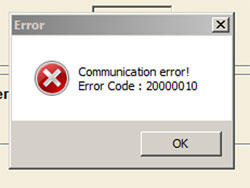
There are a couple of error codes and a few possible causes listed below…
Error Code: 20000010 or 20000011
1. Make sure you have your printer connected directly to the computer using a USB cable.
Note: The reset utility will not work over a network connection
2. If you are trying to run the utility on Vista or Windows 7 it often will not work. You may need to run the utility in compatiblity mode.
The solution is as follows:
- Download the Adjustment utility as you would normally and set your systems date/time as required by the instructions
- Right click on the “Adjprog” and select “Properties“
- Choose “compatibility” and select “windows xp“.
- Find and select “Run as Administrator” (if you have this option)
- Click OK at the bottom
Additional notes regarding Windows 7 are available via this article
This “How to…” video should also help explain how to set compatibility mode.
Error Code: 21000012c or 20000107
This error code appears if you have more than one potentially compatible printer connected to your computer when you try to use the reset utility.
Solutions:
- Make sure you only have the target printer (ie: the one you wish to reset) connected to your computer and turned on.
- Try selecting the specific port that your target printer is connected on rather than “Auto Select”
(Via “Settings” button in AdjProg utility)
Error Code: 21000068
This error code appears on utilities that have not been unlocked properly and as such cannot be used.
This is particularly common for Adjustment programs that were supposedly released for the PX810FW and a few T60, T50 versions too.
There is no solution that makes these utilities work so there is no point continuing to try. The best solution now is usually to check compatibility for your printer using the WICReset tool and, if compatible, use that instead.